Escape room booking software, built by operators
Online bookings, payment gateways, waivers and daily venue schedules, in one platform. Plans from US$29/month, with no Riddlio booking commission.
Comparing options? Use our escape room booking software checklist to test schedules, costs and the guest journey.
An escape room booking system connects the room, session and player count your guest chooses with the reservation your team manages. Riddlio brings that booking together with payment records, waiver preparation and your daily schedule.
Built to run our own escape room
Riddlio started as an internal tool for Tick Tock Escape Room in Toowoomba, Australia. We use it in our venue every day and are now opening it to other operators. Read how we use Riddlio at our own venue.
The screens below show the product with demo data: how guests choose a game and how staff find bookings and payment status. Follow the booking-to-check-in walkthrough, review room scheduling and availability, or book a guided demo for your venue.
A software subscription is separate from card-processing fees and SMS usage. Compare plans and their limits before choosing one.
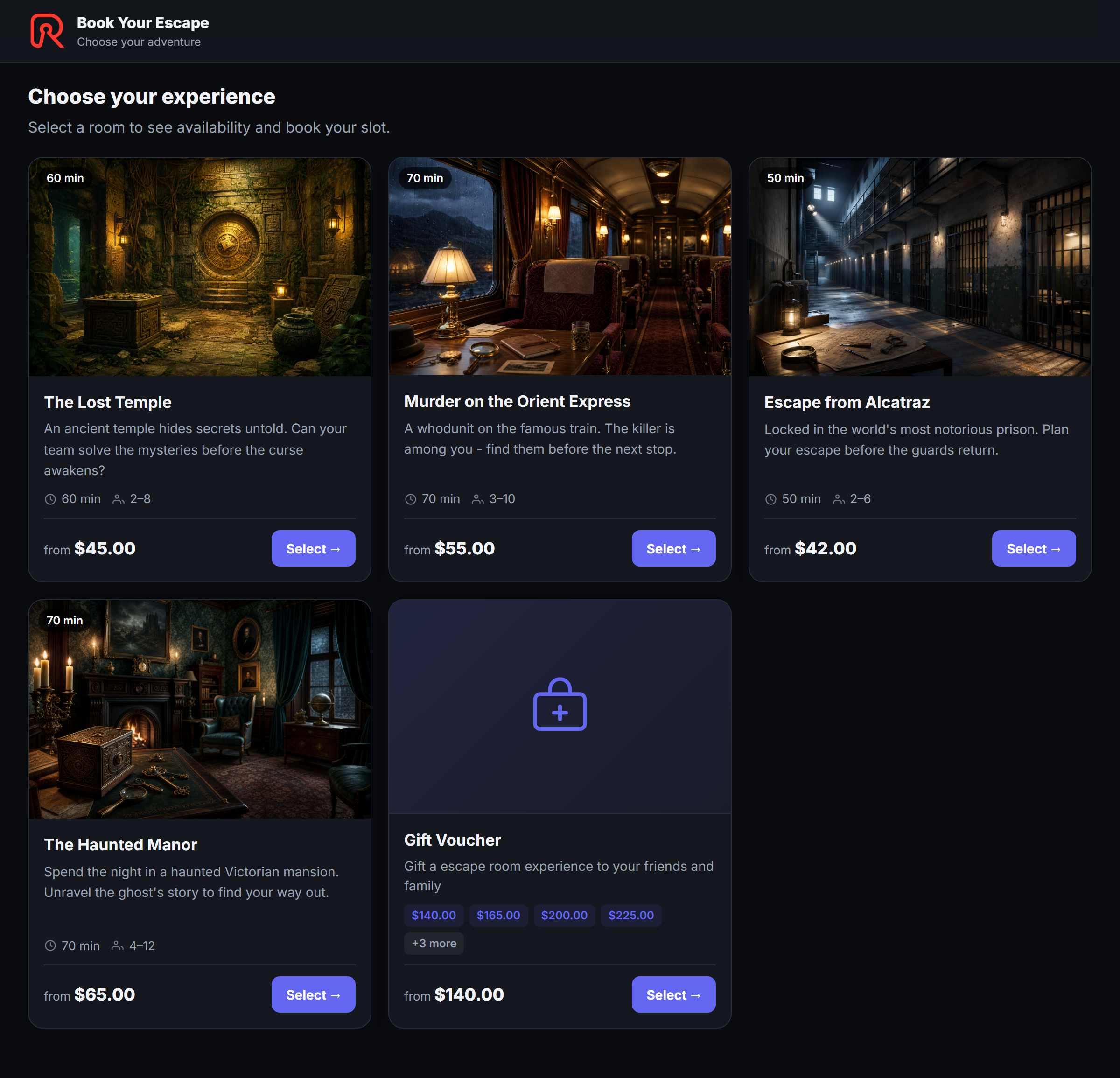
Public booking widget
Customers can choose the room from a polished widget on your own website.
The public booking flow shows real room artwork, duration, player limits, pricing, gift vouchers, and live availability before the customer reaches checkout.
Booking records
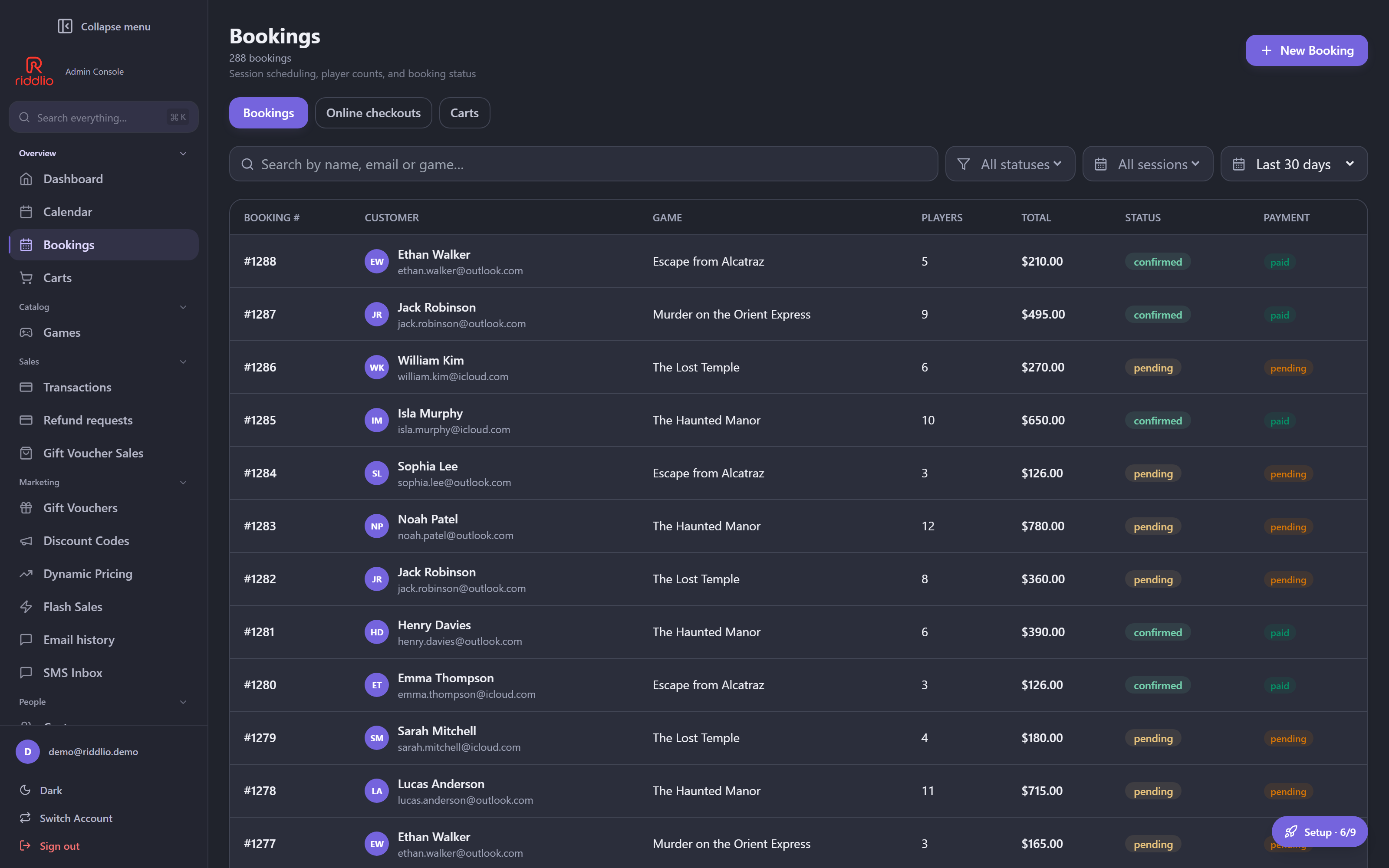
Every booking stays searchable, readable, and tied to payment status.
The bookings screen shows customer details, game assignment, player count, booking total, session status, and payment state in one table so staff can find the right record quickly.
Choose how each booking gets paid.
Your payment policy and your payment provider are two different decisions. Decide what guests owe when booking, then check that the provider and plan support the flow you want.
For a worked balance example and the screens your team uses, follow the deposit walkthrough.
- Full payment
- Collect the booking amount at checkout through your connected provider.
- A deposit
- Collect part of the total now. Review what has already been paid before collecting the remaining balance.
- Payment on arrival
- Accept the reservation without online payment and use your venue's arrival process to collect the balance.
Software plans start at US$29/month. Riddlio charges 0% booking commission. Payment-provider processing fees, SMS usage and applicable taxes are separate. Compare plan features and limits.
Booking tools for the whole visit
Availability varies by plan. Payment-provider fees and SMS credits are separate.
Online bookings
Show room availability and player counts in an embedded widget or hosted page. Guests can book on phone, tablet or desktop.
Payment processing
Choose deposits, full payment or payment on arrival. Review payment records and balances; supported providers and workflows vary by plan and setup.
Dynamic pricing
Set different prices for peak/off-peak, weekends, holidays, and events. Group discounts, early-bird pricing, and last-minute deals — all configurable.
Automated SMS reminders
Configure pre-visit SMS reminders and eligible bookings. SMS credits are billed separately from the software subscription.
Gift vouchers
Sell gift vouchers online that customers redeem against future bookings. Track voucher usage and balances automatically. No expiry by default.
Digital waivers
Digital waivers that customers sign online before their booking. Stored securely and linked to their booking record for easy retrieval.
Promo codes
Create promotional codes with percentage or flat discounts. Set usage limits, expiry dates, and restrict to specific games or time slots.
Analytics & reporting
Revenue dashboard, booking analytics, game performance, no-show tracking, and CSV exports. MCP AI integration on Pro and Unlimited plans for natural-language querying.
Check the setup before you go live.
Keep your existing website. Configure and check the booking flow before changing the links your customers use.
Moving systems? Book a setup conversation to review your source data, future bookings and voucher requirements.
- Set the room rules. Review player limits, session lengths, prices and availability for each experience.
- Check payments and guest messages. Confirm the provider, payment policy, confirmation details and any reminder settings.
- Prepare the arrival routine. Review the waiver setup and show staff where to find the booking, balance and participant records.
- Test before switching. Use a test setup to review the guest journey on phone and desktop. Verify the booking and payment records before publishing your booking links.
Compare the work, not just the feature list.
Bring a real example from your venue. Use the same tests when comparing Riddlio with your current booking system.
Open the full demo checklist- A group booking
- Check minimum and maximum players, private sessions and the price shown on a phone. See the guest journey.
- A deposit and its balance
- Ask where staff see the amount already paid and what remains. Follow the worked payment example.
- A busy arrival
- Find the booking, check participant waivers and record arrival. Explore the staff workflow.
Common questions about escape room booking systems
How do I switch from another booking system?+
What is an escape room booking system?+
How much does Riddlio cost?+
Can I embed the booking system on my existing website?+
Does the booking system handle payments?+
Can I sell gift vouchers through the booking system?+
Does the system support dynamic pricing?+
See the booking flow for your venue.
Start a 14-day trial with no charge during the trial. Payment details are required. Features vary by plan; provider fees and SMS usage are separate.